Posted: Fri Feb 07, 2014 7:04 am Post subject:
DIY Euclidean Polyrhythm Generator Subject description: for ~$20
Overview:
A couple a years ago, a guy called Tombola made a Euclidean Polyrhythm generator for Arduino. The documentation was very sparse and the code was rough: http://www.muffwiggler.com/forum/topic-45485.html
Here's the original video demo from then:
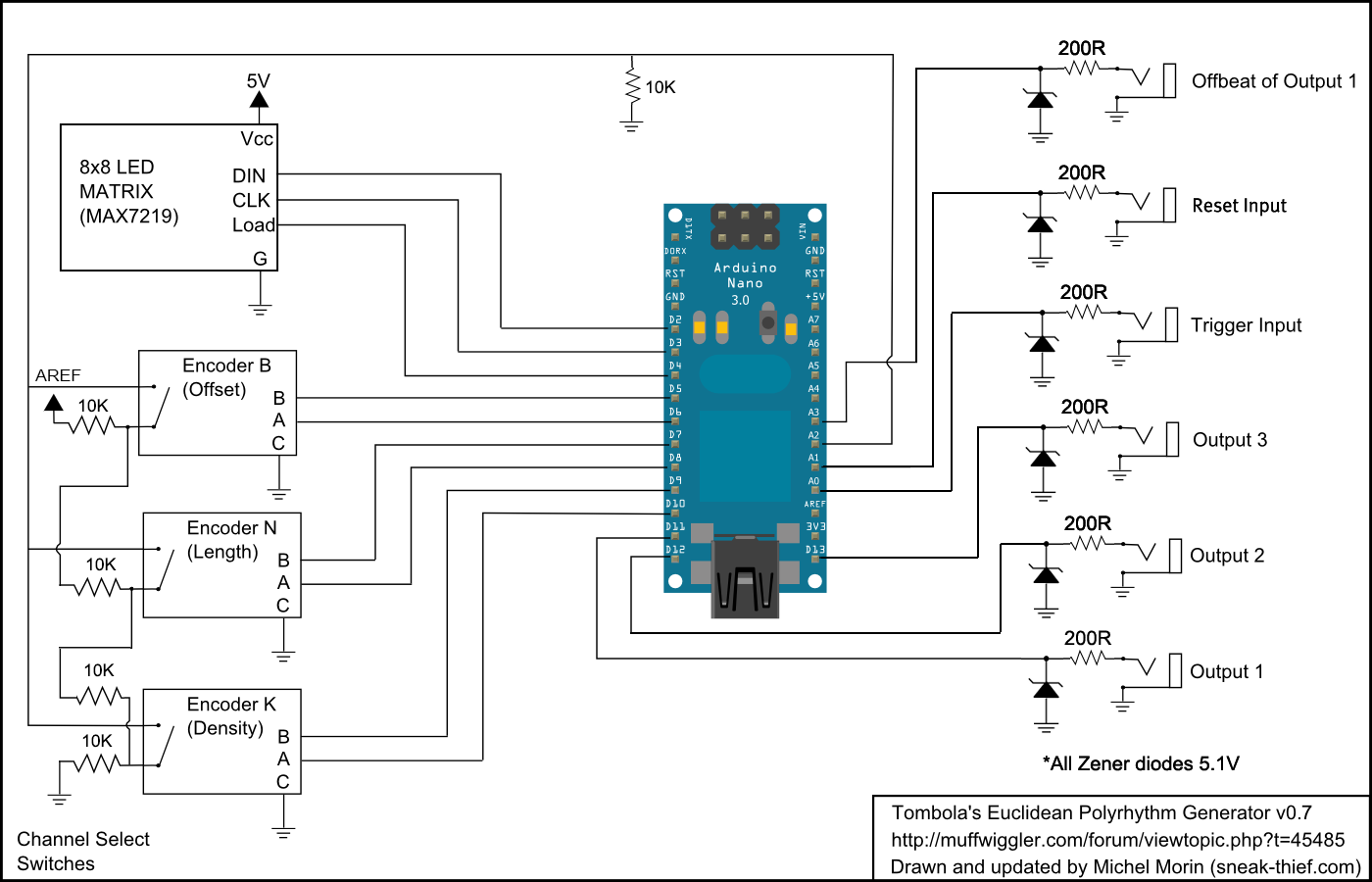
I cleaned up Tombola's code somewhat, added Offset controls and imported a much better encoder-reading library. Now the encoders work great! I also made a schematic and included much-needed diode input-protection.
[FEB 2015 UPDATE]
User Interface:
When the rhythms are playing, the display flips between page 1 (steps 1-8 ) and page 2 (steps 9-16).
Here's what the display shows...
Row 1: What step is Output 1 playing
Row 2: Output 1 Pattern (steps 1-8 or 9-16)
Row 3: What step is Output 2 playing
Row 4: Output 2 Pattern (steps 1-8 or 9-16)
Row 5: What step is Output 3 playing
Row 6: Output 3 Pattern (steps 1-8 or 9-16)
Row 7: Which channel is selected
- 2 dots on the left for Channel 1
- 2 dots in the middle for Channel 2
- 2 dots on the right for Channel 3
- When you have Channel 1 selected and you rotate the N- and K- and Offset knobs, Rows 1 and 2 will respectively show the pattern length (N), pattern density (K) or Offset (O).
The same goes for Channel 2 (Rows 3 and 4) and Channel 3 (Rows 5 and 6)
- Rotating the Offset encoder clockwise rotates the steps up to one full rotation.
The rest I recommend ordering from Tayda for about $5:
- 6x 5.1V Zener diodes (protects inputs by limiting voltages both over and under 0-5V)
- 6x 200 Ohm resistors (one for each input/output)
- 6x Jacks (4 gates outs, 1 clock in, reset in)
- SPST button (if you want a reset switch)
- 4x 15k resistors
Extras: There's a possibility of adding another 4 analog/digital ins for future CV/gate usage. for CV control, I recommend using 2x 1N5819's per CV input. I'll draw a schematic for that later.
Posted: Mon Feb 02, 2015 7:36 am Post subject:
Anyone completed this? :?: Subject description: Problems with LED Matrix
This is a fantastic project. I've managed to assemble the hardware parts, but the software is another issue. Checked rotary encoders, they are good. Some data is getting to the display, but it is garbled. Swapped MAX72xx chips = same problem. Swapped LED Matrix = same problem.
Not familiar with editing library for Arduino, suspecting that now is the time to learn.
Any help will be greatly appreciated.
Posted: Tue Feb 03, 2015 11:58 pm Post subject:
Display Issue Fixed :D
I swapped the display board and it works!
Haven't "ohmed" out the board yet to find it's problem, just enjoying the fact that this module is working!
Thanks sneakthief for your help.
I will post some pic and samples when I get it all wrapped up.
Joined: Dec 22, 2010 Posts: 26 Location: Rennes, FRANCE
Audio files: 2
Posted: Sat May 02, 2015 7:06 am Post subject:
ok ,it's don't work ....
I'm not sure about the pin out of the encoder to wiring them ?
I Bought the stuff on the e-bay link shown at the top of this topic, it's low cost, but no explainations, no paper, no datasheet ...
And on the encoder the ABC are not show. ....
I search but there is different pinout possible ...
Is anyone know the good way ?
Thanks
Joined: Dec 22, 2010 Posts: 26 Location: Rennes, FRANCE
Audio files: 2
Posted: Sat May 02, 2015 7:48 am Post subject:
Waouuu your are so quick to answer ...
Thank for the answer.
I Plug as you tell ...
But There is another problem, because the matrix still showthe same "picture" and don't move ...
Here is my picture.
Thanks for helping
DSC00946.JPG
Description:
Filesize:
798.61 KB
Viewed:
823 Time(s)
This image has been reduced to fit the page. Click on it to enlarge.
The original program is for an Arduino Nano, so maybe there are some pins that are different.
All I know is that when the display shows that pattern, it means that the data it's receiving is scrambled, _________________ Sneak-Thief - raw electrofunk
Joined: Dec 22, 2010 Posts: 26 Location: Rennes, FRANCE
Audio files: 2
Posted: Sun May 10, 2015 7:06 am Post subject:
Hello
It's work good !
First I want to say thanks to Sneakthief and Tombola for this good job !!
I did a smal video with the out of the euclidean in 1V/oct of my VCOZ3000
euclidean.mpg
Then if someone want to realise this project.
Encoders
The picture encoder.png show how I have solder the wires.
Because if you buy the ebay stuff, there is no sign on it to know which is the ABC.
And the for the two others you can't do mistake.
Matrix
As well there is no "good" mark to know the good way to plug it.
There is a reference number on it. picture matrix.jpg
I put this reference next to FC-16 DISY1. At the opposite of IN / OUT
picture board.jpg
PCB
I don't think a pcb is indispensable.
I did the circuit on a perfboard picture perfboard.jpg
It was just to test, I'll correctly wire this stuff to put on a module.
Upgrade:
It could be good to add a 555 LFO like here :
http://www.555-timer-circuits.com/metronome.html
It allow you to save a LFO on your modular.
And it's possible to plug the LFO with a switch jack, so, without some jack in trig, you use the 555 and when you plug a jack, the 555 is disable.
Euclidean.MPG
Description:
Filesize:
11.22 MB
Viewed:
832 Time(s)
Encoder.png
Description:
Filesize:
1.48 MB
Viewed:
718 Time(s)
This image has been reduced to fit the page. Click on it to enlarge.
matrix.JPG
Description:
Filesize:
701.11 KB
Viewed:
713 Time(s)
This image has been reduced to fit the page. Click on it to enlarge.
perfboard.JPG
Description:
Filesize:
789.6 KB
Viewed:
717 Time(s)
This image has been reduced to fit the page. Click on it to enlarge.
board.JPG
Description:
Filesize:
831.47 KB
Viewed:
801 Time(s)
This image has been reduced to fit the page. Click on it to enlarge.
Offbeat: play a beat every on step that trigger #1 does NOT play.
Re. My extra jacks: as I wrote above in the front panel description " Extras: There's a possibility of adding another 4 analog/digital ins for future CV/gate usage. for CV control, I recommend using 2x 1N5819's per CV input. I'll draw a schematic for that later.
...I put A, B, C & D as placeholders for whatever inputs make sense. I decided to set mine to gate inputs for density and length" _________________ Sneak-Thief - raw electrofunk
You cannot post new topics in this forum You cannot reply to topics in this forum You cannot edit your posts in this forum You cannot delete your posts in this forum You cannot vote in polls in this forum You cannot attach files in this forum You can download files in this forum


 Forum index » DIY Hardware and Software


 FAQ
FAQ Calendar
 Search
 Memberlist
 Usergroups
 Register
 Profile
 Log in to check your private messages
 Log in
 Chat Room




 I swapped the display board and it works!


